Byla vydána nová verze 3.2.8 svobodné aplikace pro úpravu a vytváření rastrové grafiky GIMP (GNU Image Manipulation Program). Přehled novinek v oznámení o vydání a v souboru NEWS na GitLabu. Nový GIMP je již k dispozici také na Flathubu.
Projekt openSUSE dnes, 3. listopadu 2026, oficiálně vydal openSUSE Leap 16.1, novou verzi své stabilní linuxové distribuce. Novinkou je také Immutable Mode, který nahrazuje dosavadní samostatnou distribuci openSUSE Leap Micro. Podrobnosti o novém vydání najdete v oficiálním oznámení nebo v českém překladu oznámení. Instalační obrazy jsou již dostupné na get.opensuse.org. Vydání společně oslavíme v pátek ve virtuálním baru a na … více »
Bylo oznámeno vydání Fedora Linuxu 45. Ve finální verzi vychází šest oficiálních edic: Fedora Workstation a Fedora KDE Plasma Desktop pro desktopové, Fedora Server pro serverové, Fedora Cloud pro cloudové nasazení, Fedora CoreOS pro ty, kteří preferují neměnné systémy a Fedora IoT pro internet věcí. Vedle nich jsou k dispozici také další atomické desktopy, spiny a laby. Podrobný přehled novinek v samostatných článcích na stránkách
… více »Vědci z MIT CSAIL představili koncept 'weight-space programming' a názorně předvedli, že pokročilé jazykové modely SI dokážou přímo číst a upravovat váhy neuronových sítí. Studie ukazuje, že modely nejen dokážou identifikovat účel sítí z pouhého nahlédnutí do jejich číselných vah, ale mohou i cíleně opravovat chyby a nedostatky, například GPT-6 Astra se změnou pouhých 0,016% vah open-weight modelu Qwen3.5-0.8B podařilo odstranit
… více »Organizátoři komunitního setkání nejen českých a slovenských správců sítí CSNOG 2027, které se uskuteční 20. a 21. ledna na půdě zlínské univerzity Tomáše Bati, oznámili prodloužení termínu pro zasílání abstraktů do programu akce. Zájemci se mohou hlásit prostřednictvím webu setkání do úterý 10. listopadu. Programová komise uvítá příspěvky věnované nejen správě sítí, ale také legislativě a regulaci nebo síťařským aktivitám studentů a pedagogů.
Bylo spuštěno předobjednávání zařízení Flipper One s Linuxem. Za 20 dolarů si lze koupit kupón a zajistit si tím speciální cenu 379 dolarů po spuštění kampaně na Kickstarteru.
Tor Browser, tj. fork webového prohlížeče Mozilla Firefox s integrovaným klientem sítě Tor přednastavený tak, aby přes tuto síť bezpečně komunikoval, byl vydán ve verzi 16.0. Postaven je na Firefoxu ESR 153. Vydána byla také nová verze 7.16 živé linuxové distribuce Tails (The Amnesic Incognito Live System), jež klade důraz na ochranu soukromí uživatelů a anonymitu. S Tor Browserem 16.0.
FreeTube, desktopový klient pro YouTube využívající lokální API, byl vydán ve verzi 0.26.0. Toto velké opravné vydání mj. vrací částečnou podporu živých přenosů nebo přepracovává zobrazování titulků a obecně nastavení videa v přehrávači – FreeTube umožňuje např. přehrávat video s větším zrychlením.
Další vlna kyberútoků zasáhla chladicí zařízení supermarketů v sedmi evropských zemích, Belgii, Lucembursku, Švédsku, Nizozemsku, Irsku, Estonsku a Finsku. Mrazáky se v některých prodejnách opět 'proměnily v trouby' a zahřály až na 50°C, což pochopitelně vedlo ke znehodnocení uskladněných potravin. Útoky navazují na podobný incident ve Francii z první poloviny října letošního roku, pachatel stále není znám.
Settings for enp3s0:
	Supported ports: [ TP AUI BNC MII FIBRE ]
	Supported link modes:   10baseT/Half 10baseT/Full
	                        100baseT/Half 100baseT/Full
	                        1000baseT/Full
	Supported pause frame use: Symmetric Receive-only
	Supports auto-negotiation: Yes
	Supported FEC modes: Not reported
	Advertised link modes:  10baseT/Half 10baseT/Full
	                        100baseT/Half 100baseT/Full
	                        1000baseT/Full
	Advertised pause frame use: Symmetric Receive-only
	Advertised auto-negotiation: Yes
	Advertised FEC modes: Not reported
	Link partner advertised link modes:  10baseT/Half 10baseT/Full
	                                     100baseT/Half 100baseT/Full
	                                     1000baseT/Full
	Link partner advertised pause frame use: Symmetric Receive-only
	Link partner advertised auto-negotiation: Yes
	Link partner advertised FEC modes: Not reported
	Speed: 1000Mb/s
	Duplex: Full
	Port: MII
	PHYAD: 0
	Transceiver: internal
	Auto-negotiation: on
	Supports Wake-on: pumbg
	Wake-on: g
	Current message level: 0x00000033 (51)
			       drv probe ifdown ifup
	Link detected: yes
Totez na HP:
Settings for enx18d6c7087e5e:
	Supported ports: [ TP MII ]
	Supported link modes:   10baseT/Half 10baseT/Full
	                        100baseT/Half 100baseT/Full
	                        1000baseT/Half 1000baseT/Full
	Supported pause frame use: No
	Supports auto-negotiation: Yes
	Supported FEC modes: Not reported
	Advertised link modes:  10baseT/Half 10baseT/Full
	                        100baseT/Half 100baseT/Full
	                        1000baseT/Full
	Advertised pause frame use: Symmetric Receive-only
	Advertised auto-negotiation: Yes
	Advertised FEC modes: Not reported
	Link partner advertised link modes:  10baseT/Half 10baseT/Full
	                                     100baseT/Half 100baseT/Full
	                                     1000baseT/Full
	Link partner advertised pause frame use: Symmetric Receive-only
	Link partner advertised auto-negotiation: Yes
	Link partner advertised FEC modes: Not reported
	Speed: 1000Mb/s
	Duplex: Full
	Port: MII
	PHYAD: 32
	Transceiver: internal
	Auto-negotiation: on
	Supports Wake-on: pumbg
	Wake-on: g
	Current message level: 0x00007fff (32767)
			       drv probe link timer ifdown ifup rx_err tx_err tx_queued intr tx_done rx_status pktdata hw wol
	Link detected: yes
Prenos nekolikasetmegoveho souboru z Lenova na HP jede podle ksysguard zhruba k 10 MiB/s, tentyz soubor zpet zhruba k 6 MiB/s. Vzhledem k proklamovane gigabit rychlosti na tech komponentech, nemelo by spojeni jet o rad rychleji?
iperf3 -s -p3000 -fma na druhej:
iperf3 -p3000 -c IP_DRUHEJ_STRANY -fmPotom este na tom klientovi skus pridat parameter -R, ktory to skusi opacnym smerom.
Connecting to host 192.168.1.2, port 3000
[  5] local 192.168.1.1 port 55898 connected to 192.168.1.2 port 3000
[ ID] Interval           Transfer     Bitrate         Retr  Cwnd
[  5]   0.00-1.00   sec  42.2 MBytes   353 Mbits/sec    0    221 KBytes
[  5]   1.00-2.00   sec  42.5 MBytes   356 Mbits/sec    0    291 KBytes
[  5]   2.00-3.00   sec  41.9 MBytes   352 Mbits/sec    0    370 KBytes
[  5]   3.00-4.00   sec  42.2 MBytes   354 Mbits/sec    0    450 KBytes
[  5]   4.00-5.00   sec  42.3 MBytes   355 Mbits/sec    0    474 KBytes
[  5]   5.00-6.00   sec  41.3 MBytes   346 Mbits/sec    0    498 KBytes
[  5]   6.00-7.00   sec  42.3 MBytes   355 Mbits/sec    0    523 KBytes
[  5]   7.00-8.00   sec  42.3 MBytes   354 Mbits/sec    0    523 KBytes
[  5]   8.00-9.00   sec  41.8 MBytes   351 Mbits/sec    0    550 KBytes
[  5]   9.00-10.00  sec  42.1 MBytes   353 Mbits/sec    0    550 KBytes
- - - - - - - - - - - - - - - - - - - - - - - - -
[ ID] Interval           Transfer     Bitrate         Retr
[  5]   0.00-10.00  sec   421 MBytes   353 Mbits/sec    0             sender
[  5]   0.00-10.05  sec   418 MBytes   349 Mbits/sec                  receiver

iperf Done.
Takova rychlost by se mi u prenosu souboru libila vic.
 takze mu to jede na GLAN, ale ~40% rychlosti, nicmene i to by radeji nez ten souborovej prenos co se tvari jako 50% rychlost 100M site
Zacukalo, 352 Mbits/sec, Eth2USB Gigabit adapter TP-Link UE300 > USB3Nebude tá USB3 sieťovka strčená do USB2 portu?
lsusb -ta pozri, aku rychlost ukazuje (posledny stlpec) pre danu sietovu kartu. Malo by to ukazovat 5000M. Ak to bude 480M alebo este nizsie, tak to je bud v USB2 porte alebo hub to prepol do takeho rezimu.
lsusb -t -v
$ ls -t
/:  Bus 04.Port 1: Dev 1, Class=root_hub, Driver=xhci_hcd/4p, 5000M
    |__ Port 1: Dev 2, If 0, Class=Mass Storage, Driver=usb-storage, 5000M
$ ls -t -v
/:  Bus 04.Port 1: Dev 1, Class=root_hub, Driver=xhci_hcd/4p, 5000M
    ID 1d6b:0003 Linux Foundation 3.0 root hub
    |__ Port 1: Dev 2, If 0, Class=Mass Storage, Driver=usb-storage, 5000M
        ID 8564:1000 Transcend Information, Inc. JetFlash
~$ lsusb --version
lsusb (usbutils) 010
Vypisuje toto:
~$ lsusb -t -v
/:  Bus 02.Port 1: Dev 1, Class=root_hub, Driver=xhci_hcd/6p, 5000M
/:  Bus 01.Port 1: Dev 1, Class=root_hub, Driver=xhci_hcd/7p, 480M
    |__ Port 1: Dev 2, If 0, Class=Vendor Specific Class, Driver=r8152, 480M
    |__ Port 2: Dev 17, If 0, Class=Human Interface Device, Driver=usbhid, 1.5M
    |__ Port 2: Dev 17, If 1, Class=Human Interface Device, Driver=usbhid, 1.5M
    |__ Port 3: Dev 4, If 0, Class=Video, Driver=uvcvideo, 480M
    |__ Port 3: Dev 4, If 1, Class=Video, Driver=uvcvideo, 480M
    |__ Port 4: Dev 5, If 1, Class=Wireless, Driver=btusb, 12M
    |__ Port 4: Dev 5, If 0, Class=Wireless, Driver=btusb, 12M
OS je Debian 10, jestli to ma nejaky vliv.
$ lsusb --version
lsusb (usbutils) 012
jeste muzes zkusit "lsusb -t -vv"...
 (samozrejme to neresi proc Dolphin kopiruje pomalu a mc rychleji, ale to proc USB3 ethernet se chytne na USB2 rychlosti)
~$ lsusb -t -vv
/:  Bus 02.Port 1: Dev 1, Class=root_hub, Driver=xhci_hcd/6p, 5000M
/:  Bus 01.Port 1: Dev 1, Class=root_hub, Driver=xhci_hcd/7p, 480M
    |__ Port 1: Dev 7, If 1, Class=Human Interface Device, Driver=usbhid, 1.5M
    |__ Port 1: Dev 7, If 0, Class=Human Interface Device, Driver=usbhid, 1.5M
    |__ Port 2: Dev 6, If 0, Class=Vendor Specific Class, Driver=r8152, 480M
    |__ Port 3: Dev 4, If 0, Class=Video, Driver=uvcvideo, 480M
    |__ Port 3: Dev 4, If 1, Class=Video, Driver=uvcvideo, 480M
    |__ Port 4: Dev 5, If 1, Class=Wireless, Driver=btusb, 12M
    |__ Port 4: Dev 5, If 0, Class=Wireless, Driver=btusb, 12M
Adapter v usb2, klabosnice v usb3:
~$ lsusb -t -vv
/:  Bus 02.Port 1: Dev 1, Class=root_hub, Driver=xhci_hcd/6p, 5000M
/:  Bus 01.Port 1: Dev 1, Class=root_hub, Driver=xhci_hcd/7p, 480M
    |__ Port 1: Dev 7, If 1, Class=Human Interface Device, Driver=usbhid, 1.5M
    |__ Port 1: Dev 7, If 0, Class=Human Interface Device, Driver=usbhid, 1.5M
    |__ Port 2: Dev 6, If 0, Class=Vendor Specific Class, Driver=r8152, 480M
    |__ Port 3: Dev 4, If 0, Class=Video, Driver=uvcvideo, 480M
    |__ Port 3: Dev 4, If 1, Class=Video, Driver=uvcvideo, 480M
    |__ Port 4: Dev 5, If 1, Class=Wireless, Driver=btusb, 12M
    |__ Port 4: Dev 5, If 0, Class=Wireless, Driver=btusb, 12M
/:  Bus 02.Port 1: Dev 1, Class=root_hub, Driver=xhci_hcd/6p, 5000M
/:  Bus 01.Port 1: Dev 1, Class=root_hub, Driver=xhci_hcd/7p, 480M
    |__ Port 1: Dev 2, If 0, Class=Vendor Specific Class, Driver=r8152, 480M
    |__ Port 2: Dev 17, If 0, Class=Human Interface Device, Driver=usbhid, 1.5M
    |__ Port 2: Dev 17, If 1, Class=Human Interface Device, Driver=usbhid, 1.5M
    |__ Port 3: Dev 4, If 0, Class=Video, Driver=uvcvideo, 480M
    |__ Port 3: Dev 4, If 1, Class=Video, Driver=uvcvideo, 480M
    |__ Port 4: Dev 5, If 1, Class=Wireless, Driver=btusb, 12M
    |__ Port 4: Dev 5, If 0, Class=Wireless, Driver=btusb, 12M
Port 1: Dev 2, If 0, Class=Vendor Specific Class, Driver=r8152, 480M
dmesg -w a vytiahnuť sieťovku z USB, počkať pár sekúnd nech vychladne, zasunúť znova, a pozrieť čo v tom výpise pribudlo. Možno chýbajúci Firmware (i keď ten by mal byť v linux-firmware), alebo niečo o nastavení USB2. Ovládač je v jadre, takže je záhadou prečo sa to degradovalo.
[647314.926456] ACPI: Waking up from system sleep state S3
[647314.942942] ACPI: EC: interrupt unblocked
[647315.016742] ACPI: EC: event unblocked
[647315.259716] usb 1-3: reset high-speed USB device number 4 using xhci_hcd
[647315.535614] usb 1-4: reset full-speed USB device number 5 using xhci_hcd
[647315.850724] psmouse serio1: synaptics: queried max coordinates: x [..5686], y [..4758]
[647315.886558] psmouse serio1: synaptics: queried min coordinates: x [1304..], y [1164..]
[647316.322505] acpi LNXPOWER:00: Turning OFF
[647316.322593] OOM killer enabled.
[647316.322599] Restarting tasks ... done.
[647316.368067] thermal thermal_zone8: failed to read out thermal zone (-61)
[647316.379153] Bluetooth: hci0: read Intel version: 370810011003110e00
[647316.379161] Bluetooth: hci0: Intel Bluetooth firmware file: intel/ibt-hw-37.8.10-fw-1.10.3.11.e.bseq
[647316.433666] PM: suspend exit
[647316.537828] IPv6: ADDRCONF(NETDEV_UP): wlo1: link is not ready
[647316.688147] Bluetooth: hci0: unexpected event for opcode 0xfc2f
[647316.705205] Bluetooth: hci0: Intel firmware patch completed and activated
[647328.615179] IPv6: ADDRCONF(NETDEV_UP): wlo1: link is not ready
[647328.723139] IPv6: ADDRCONF(NETDEV_UP): wlo1: link is not ready
[647332.354155] IPv6: ADDRCONF(NETDEV_UP): wlo1: link is not ready
[647333.518540] wlo1: authenticate with 56:14:73:36:58:7d
[647333.525686] wlo1: send auth to 56:14:73:36:58:7d (try 1/3)
[647333.540105] wlo1: authenticated
[647333.542711] wlo1: associate with 56:14:73:36:58:7d (try 1/3)
[647333.547886] wlo1: RX AssocResp from 56:14:73:36:58:7d (capab=0x431 status=0 aid=1)
[647333.553353] wlo1: associated
[647333.601145] IPv6: ADDRCONF(NETDEV_CHANGE): wlo1: link becomes ready
[650220.528462] [drm:intel_pipe_update_end [i915]] *ERROR* Atomic update failure on pipe A (start=174424 end=174425) time 272 us, min 763, max 767, scanline start 757, end 770
[651376.415259] r8152 1-1:1.0 enx18d6c7087e5e: carrier on
[652811.903854] IPv6: ADDRCONF(NETDEV_UP): wlo1: link is not ready
[652811.937973] IPv6: ADDRCONF(NETDEV_UP): wlo1: link is not ready
[652813.031717] IPv6: ADDRCONF(NETDEV_UP): wlo1: link is not ready
[652815.187025] wlo1: authenticate with 56:14:73:36:58:7d
[652815.190575] wlo1: send auth to 56:14:73:36:58:7d (try 1/3)
[652815.200475] wlo1: authenticated
[652815.204029] wlo1: associate with 56:14:73:36:58:7d (try 1/3)
[652815.266088] wlo1: RX AssocResp from 56:14:73:36:58:7d (capab=0x431 status=0 aid=1)
[652815.268846] wlo1: associated
[652815.295794] IPv6: ADDRCONF(NETDEV_CHANGE): wlo1: link becomes ready
[653154.294106] wlo1: authenticate with 56:14:73:36:58:7d
[653154.299291] wlo1: send auth to 56:14:73:36:58:7d (try 1/3)
[653154.304966] wlo1: authenticated
[653154.310878] wlo1: associate with 56:14:73:36:58:7d (try 1/3)
[653154.420710] wlo1: associate with 56:14:73:36:58:7d (try 2/3)
[653154.508090] wlo1: associate with 56:14:73:36:58:7d (try 3/3)
[653154.614125] wlo1: association with 56:14:73:36:58:7d timed out
[653166.671775] IPv6: ADDRCONF(NETDEV_UP): wlo1: link is not ready
[653166.761910] IPv6: ADDRCONF(NETDEV_UP): wlo1: link is not ready
[653191.557551] IPv6: ADDRCONF(NETDEV_UP): wlo1: link is not ready
[653196.712253] wlo1: authenticate with 56:14:73:36:58:7d
[653196.717779] wlo1: send auth to 56:14:73:36:58:7d (try 1/3)
[653196.720668] wlo1: authenticated
[653196.723752] wlo1: associate with 56:14:73:36:58:7d (try 1/3)
[653196.728288] wlo1: RX AssocResp from 56:14:73:36:58:7d (capab=0x431 status=0 aid=1)
[653196.730118] wlo1: associated
[653196.743149] IPv6: ADDRCONF(NETDEV_CHANGE): wlo1: link becomes ready
[654407.500755] r8152 1-1:1.0 enx18d6c7087e5e: Rx status -71
[654407.500892] r8152 1-1:1.0 enx18d6c7087e5e: Rx status -71
[654407.501078] r8152 1-1:1.0 enx18d6c7087e5e: Rx status -71
[654407.501724] usb 1-1: USB disconnect, device number 2
[654436.549039] usb usb2-port1: Cannot enable. Maybe the USB cable is bad?
[654440.770954] usb usb2-port1: Cannot enable. Maybe the USB cable is bad?
[654444.841002] usb usb2-port1: Cannot enable. Maybe the USB cable is bad?
[654449.054750] usb usb2-port1: Cannot enable. Maybe the USB cable is bad?
[654453.128709] usb usb2-port1: Cannot enable. Maybe the USB cable is bad?
[654454.411823] usb 1-1: new high-speed USB device number 18 using xhci_hcd
[654454.561558] usb 1-1: New USB device found, idVendor=2357, idProduct=0601, bcdDevice=30.00
[654454.561575] usb 1-1: New USB device strings: Mfr=1, Product=2, SerialNumber=6
[654454.561586] usb 1-1: Product: USB 10/100/1000 LAN
[654454.561595] usb 1-1: Manufacturer: TP-LINK
[654454.561604] usb 1-1: SerialNumber: 000001000000
[654454.700303] usb 1-1: reset high-speed USB device number 18 using xhci_hcd
[654454.884082] r8152 1-1:1.0 eth0: v1.09.9
[654455.001587] r8152 1-1:1.0 enx18d6c7087e5e: renamed from eth0
Po znovuzapojeni neslo spojeni uz vubec, tak jsem restartoval noutas (ethernet by mel jit nahodit asi elegantneji, ze?), sshd a spojeni opet jde. Puvodne jsem mel adapter v tom druhem USB ale zdalo se mi to pomale tak jsem to dal do toho "ss" portu. Spojeni se rozbehlo, ale ovladac sitovky tedy stale jede na USB2.
[654453.128709] usb usb2-port1: Cannot enable. Maybe the USB cable is bad?Ako keby si mal požutý nejaký kábel. Posledne som niečo také zažil keď sme si púšťali walkmany. Taká požutá páska, to ti bolo zábavy. Ten parameter -w tam bo na to, aby človek videl čo mu pribudne vo výpise po zasunutí vychladnutej sieťovky, a nemusel to prácne loviť z výpisu po zobudení notebooku s kadejakými blútútami, wifinami a patlapadmi. PS: z toho výpisu by som si nebol istý či náhodou nemáš zapnutú WiFi cez ktorú ideš. Asi si nenastavoval agregáciu linky aby sa ti zrátali prenosové rýchlosti obidvoch sieťoviek.
[654453.128709] usb usb2-port1: Cannot enable. Maybe the USB cable is bad?
[654454.411823] usb 1-1: new high-speed USB device number 18 using xhci_hcd
Ale odporučil by som to reštartnúť, či to nie je nejakou bugou v ACPI HW.
~$ lsusb -t -vv
/:  Bus 02.Port 1: Dev 1, Class=root_hub, Driver=xhci_hcd/1p, 5000M
/:  Bus 01.Port 1: Dev 1, Class=root_hub, Driver=xhci_hcd/6p, 480M
    |__ Port 4: Dev 2, If 0, Class=Hub, Driver=hub/4p, 480M
        |__ Port 1: Dev 3, If 0, Class=Video, Driver=uvcvideo, 480M
        |__ Port 1: Dev 3, If 1, Class=Video, Driver=uvcvideo, 480M
        |__ Port 2: Dev 4, If 0, Class=Vendor Specific Class, Driver=rtsx_usb, 480M
        |__ Port 3: Dev 5, If 0, Class=Wireless, Driver=btusb, 12M
        |__ Port 3: Dev 5, If 1, Class=Wireless, Driver=btusb, 12M
Je mozne ze ten adapter lze? Ze ve skutecnosti neni pro usb3?
a ve vypisech z HP mel:
Port 1: Dev 2, If 0, Class=Vendor Specific Class, Driver=r8152, 480Ma v neposledni rade, resime USB Ethernet, ne PCIe Wifi
 uz ti asi doslo ze Wifi neresime, ale resime USB3 Gigabit Ethernet s chipem R8153 pouzivajici ovladac R8152
$ lsusb -t -v
/:  Bus 04.Port 1: Dev 1, Class=root_hub, Driver=xhci_hcd/4p, 5000M
    ID 1d6b:0003 Linux Foundation 3.0 root hub
    |__ Port 2: Dev 5, If 0, Class=Vendor Specific Class, Driver=ax88179_178a, 5000M
        ID 0b95:1790 ASIX Electronics Corp. AX88179 Gigabit Ethernet
a test rychlosti:
$ iperf3 -p3000 -c 192.168.10.220 -fm
Connecting to host 192.168.10.220, port 3000
[  5] local 192.168.10.6 port 50294 connected to 192.168.10.220 port 3000
[ ID] Interval           Transfer     Bitrate         Retr  Cwnd
[  5]   0.00-1.00   sec   112 MBytes   937 Mbits/sec    0    389 KBytes
[  5]   1.00-2.00   sec   109 MBytes   918 Mbits/sec    0    450 KBytes
[  5]   2.00-3.00   sec   111 MBytes   927 Mbits/sec    0    551 KBytes
[  5]   3.00-4.00   sec   110 MBytes   919 Mbits/sec    0    646 KBytes
[  5]   4.00-5.00   sec   110 MBytes   922 Mbits/sec    0    646 KBytes
[  5]   5.00-6.00   sec   110 MBytes   923 Mbits/sec    0    686 KBytes
[  5]   6.00-7.00   sec   109 MBytes   912 Mbits/sec    0    686 KBytes
[  5]   7.00-8.00   sec   110 MBytes   923 Mbits/sec    0    757 KBytes
[  5]   8.00-9.00   sec   109 MBytes   911 Mbits/sec    0    878 KBytes
[  5]   9.00-10.00  sec   110 MBytes   923 Mbits/sec    0    878 KBytes
- - - - - - - - - - - - - - - - - - - - - - - - -
[ ID] Interval           Transfer     Bitrate         Retr
[  5]   0.00-10.00  sec  1.07 GBytes   922 Mbits/sec    0             sender
[  5]   0.00-10.00  sec  1.07 GBytes   918 Mbits/sec                  receiver

iperf Done.
bohuzel ADU-SG uz se neprodava, jen ten ADU-SR co by sis asi nepomohl, pripadne nasel ADU-SG na Aukru do patku
/:  Bus 02.Port 1: Dev 1, Class=root_hub, Driver=xhci_hcd/6p, 5000M
    |__ Port 1: Dev 2, If 0, Class=Mass Storage, Driver=uas, 5000M
/:  Bus 01.Port 1: Dev 1, Class=root_hub, Driver=xhci_hcd/7p, 480M
    |__ Port 2: Dev 8, If 0, Class=Human Interface Device, Driver=usbhid, 1.5M
    |__ Port 2: Dev 8, If 1, Class=Human Interface Device, Driver=usbhid, 1.5M
    |__ Port 3: Dev 4, If 0, Class=Video, Driver=uvcvideo, 480M
    |__ Port 3: Dev 4, If 1, Class=Video, Driver=uvcvideo, 480M
    |__ Port 4: Dev 5, If 1, Class=Wireless, Driver=btusb, 12M
    |__ Port 4: Dev 5, If 0, Class=Wireless, Driver=btusb, 12M
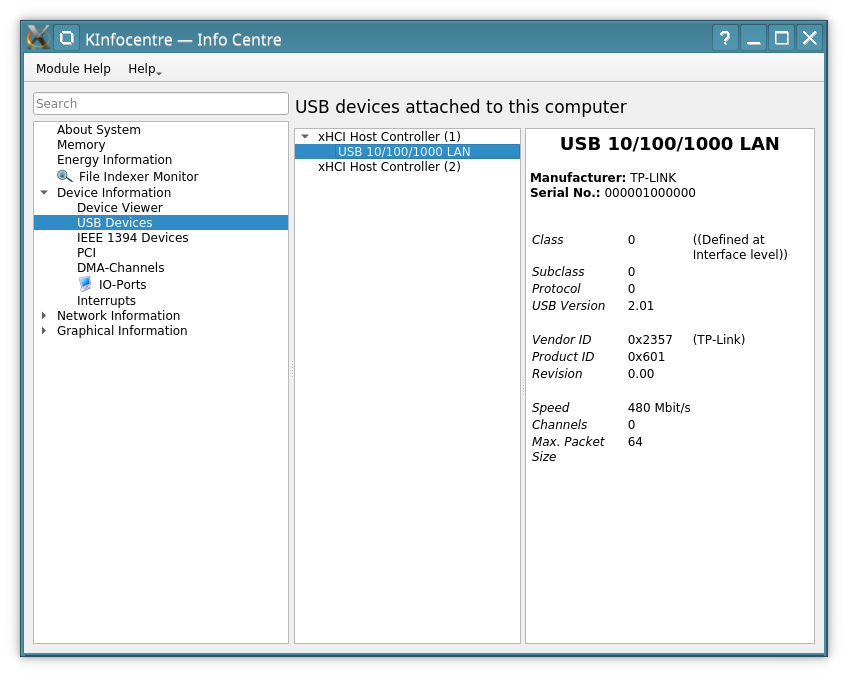
Ale dam do stejneho portu ten tp-link a viz prilozeny screenshot, jevi se jako v usb2. Vice lidi si na ten adapter stezuje, udajne mel ten problem zmizet od jadra 4.15. Celkem vzato, ted tedy vim ze sit nebezi plnou rychlosti ale nejak radikalne to nepotrebuji resit, pro bezne denni uzivani si vystacim s tim jak to ted funguje a treba s Debianem 11 se to zlepsi. Ale neni to kriticke a kazdopadne vam vsem dekuji za uzitecne tipy, aspon jsem se priucil novym prikazum.
Tiskni
Sdílej:


 AbcLinuxu.cz
 ITBiz.cz
 HDmag.cz
 AbcPráce.cz
 1.8.2021 18:18