Byla vydána verze 1.94.0 programovacího jazyka Rust (Wikipedie). Podrobnosti v poznámkách k vydání. Vyzkoušet Rust lze například na stránce Rust by Example. Zveřejněny byly výsledky průzkumu mezi vývojáři v programovacím jazyce Rust: 2025 State of Rust Survey Results.
Google zveřejnil seznam 185 organizací přijatých do letošního Google Summer of Code (GSoC). Dle plánu se zájemci přihlašují od 16. do 31. března. Vydělat si mohou od 750 do 6600 dolarů. V Česku a na Slovensku je to 900 dolarů za malý, 1800 dolarů za střední a 3600 dolarů za velký projekt. Další informace v často kladených otázkách (FAQ). K dispozici jsou také statistiky z minulých let.
Byla vydána únorová aktualizace aneb nová verze 1.110 editoru zdrojových kódů Visual Studio Code (Wikipedie). Přehled novinek i s náhledy a videi v poznámkách k vydání. Ve verzi 1.110 vyjde také VSCodium, tj. komunitní sestavení Visual Studia Code bez telemetrie a licenčních podmínek Microsoftu.
Apple představil 13palcový MacBook Neo s čipem A18 Pro. V základní konfiguraci za 16 990 Kč.
Kalifornský zákon AB 1043 platný od 1. ledna 2027 vyžaduje, aby operační systémy požadovaly po uživatelích věk nebo datum narození a skrze API poskytovaly aplikacím informaci, zda je uživatel mladší 13 let, má 13 až 16 let, má 16 až 18 let nebo má alespoň 18 let. Vývojáři linuxových distribucí řeší, co s tím (Ubuntu, Fedora, …).
Konference LinuxDays 2026 proběhne o víkendu 3. a 4. října v Praze v areálu ČVUT v Dejvicích na FIT. Čekají vás desítky přednášek, workshopy, stánky a setkání se spoustou chytrých lidí.
Nové verze webových prohlížečů Chrome a Firefox jsou vydávány každé 4 týdny. Aktuální verze Chrome je 145. Aktuální verze Firefoxu je 148. Od září přejde Chrome na dvoutýdenní cyklus vydávání. V kterém týdnu bude mít Chrome větší číslo verze než Firefox? 😀
Apple představil nové čipy M5 Pro a M5 Max, MacBook Pro s čipy M5 Pro a M5 Max, MacBook Air s čipem M5 a Studio Display a nový Studio Display XDR.
Bylo spuštěno hlasování o přednáškách a workshopech pro letošní Installfest, jenž proběhne o víkendu 28. a 29. března v Praze na Karlově náměstí 13.
Byla vydána (Mastodon, 𝕏) třetí RC verze GIMPu 3.2. Přehled novinek v oznámení o vydání. Podrobně v souboru NEWS na GitLabu.
 23.4.2022 22:28
cbrpnk | skóre: 10
| blog: bl0gium
23.4.2022 22:28
cbrpnk | skóre: 10
| blog: bl0gium
Řešení dotazu:
 23.4.2022 22:59
Jendа | skóre: 78
| blog: Jenda
| JO70FB
23.4.2022 22:59
Jendа | skóre: 78
| blog: Jenda
| JO70FB
cal | tail -n6 | grep -nw $(date +%e) | cut -d: -f1Akorát to teda nejsou týdny 1-4 ale 1-6, protože týden má jenom 7 dní a né každý měsíc začíná v pondělí.
 24.4.2022 01:50
k3dAR | skóre: 63
24.4.2022 01:50
k3dAR | skóre: 63
 24.4.2022 01:52
k3dAR | skóre: 63
24.4.2022 01:52
k3dAR | skóre: 63
ncal -1 -b -M -h | tail -n6 | grep -nw $(date +%e) | cut -d: -f1
24.4.2022 01:56
k3dAR | skóre: 63
24.4.2022 03:45
k3dAR | skóre: 63
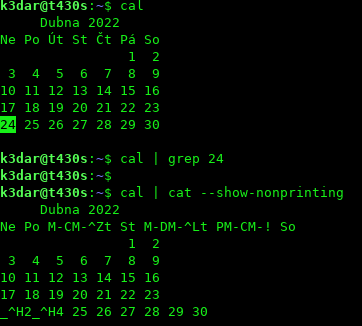
cal
     April 2022
Mo Tu We Th Fr Sa Su
             1  2  3
 4  5  6  7  8  9 10
11 12 13 14 15 16 17
18 19 20 21 22 23 24
25 26 27 28 29 30
cal | grep -wo $(date +%e)
24
cal | tail -n6 | grep -wn $(date +%e)
4:18 19 20 21 22 23 24
Nevím ale jaký je rozdíl mezi cal a ncal. Ten druhý nemám vůbec nainstalovaný.
24.4.2022 06:15
Jendа | skóre: 78
| blog: Jenda
| JO70FB
24.4.2022 13:22
k3dAR | skóre: 63

ls -l $(which cal)
lrwxrwxrwx 1 root root 4 bře 30  2020 /usr/bin/cal -> ncal

dpkg -S bin/cal | grep 'cal$'
bsdmainutils: /usr/bin/cal

dpkg -l | grep bsdmainutils
ii  bsdmainutils    11.1.2ubuntu3    amd64    collection of more utilities from FreeBSD
man cal
CAL(1)                                                                                                 BSD General Commands Manual                                                                                                CAL(1)

NAME
     cal, ncal — displays a calendar and the date of Easter

SYNOPSIS
     cal [-31jy] [-A number] [-B number] [-d yyyy-mm] [[month] year]
     cal [-31j] [-A number] [-B number] [-d yyyy-mm] -m month [year]
     ncal [-C] [-31jy] [-A number] [-B number] [-d yyyy-mm] [[month] year]
     ncal [-C] [-31j] [-A number] [-B number] [-d yyyy-mm] -m month [year]
     ncal [-31bhjJpwySM] [-A number] [-B number] [-H yyyy-mm-dd] [-d yyyy-mm] [-s country_code] [[month] year]
     ncal [-31bhJeoSM] [-A number] [-B number] [-d yyyy-mm] [year]

DESCRIPTION
     The cal utility displays a simple calendar in traditional format and ncal offers an alternative layout, more options and the date of Easter.  The new format is a little cramped but it makes a year fit on a 25x80 terminal.  If
     arguments are not specified, the current month is displayed.

     The options are as follows:

     -h      Turns off highlighting of today.

     -J      Display Julian Calendar, if combined with the -o option, display date of Orthodox Easter according to the Julian Calendar.

     -e      Display date of Easter (for western churches).

     -j      Display Julian days (days one-based, numbered from January 1).

     -m month
             Display the specified month.  If month is specified as a decimal number, appending ‘f’ or ‘p’ displays the same month of the following or previous year respectively.

     -o      Display date of Orthodox Easter (Greek and Russian Orthodox Churches).

     -p      Print the country codes and switching days from Julian to Gregorian Calendar as they are assumed by ncal.  The country code as determined from the local environment is marked with an asterisk.

     -s country_code
             Assume the switch from Julian to Gregorian Calendar at the date associated with the country_code.  If not specified, ncal tries to guess the switch date from the local environment or falls back to September 2, 1752.
             This was when Great Britain and her colonies switched to the Gregorian Calendar.

     -w      Print the number of the week below each week column.

     -y      Display a calendar for the specified year. This option is implied when a year but no month are specified on the command line.

     -3      Display the previous, current and next month surrounding today.

     -1      Display only the current month. This is the default.

     -A number
             Months to add after. The specified number of months is added to the end of the display. This is in addition to any date range selected by the -y, -3, or -1 options. For example, “cal -y -B2 -A2” shows everything from
             November of the previous year to February of the following year. Negative numbers are allowed, in which case the specified number of months is subtracted. For example, “cal -y -B-6” shows July to December. And “cal
             -A11” simply shows the next 12 months.

     -B number
             Months to add before. The specified number of months is added to the beginning of the display. See -A for examples.

     -C      Completely switch to cal mode. For cal like output only, use -b instead.

     -N      Switch to ncal mode.

     -d yyyy-mm
             Use yyyy-mm as the current date (for debugging of date selection).

     -H yyyy-mm-dd
             Use yyyy-mm-dd as the current date (for debugging of highlighting).

     -M      Weeks start on Monday.

     -S      Weeks start on Sunday.

     -b      Use oldstyle format for ncal output.

     A single parameter specifies the year (1–9999) to be displayed; note the year must be fully specified: “cal 89” will not display a calendar for 1989.  Two parameters denote the month and year; the month is either a number be‐
     tween 1 and 12, or a full or abbreviated name as specified by the current locale.  Month and year default to those of the current system clock and time zone (so “cal -m 8” will display a calendar for the month of August in the
     current year).

     Not all options can be used together. For example, the options -y, -3, and -1 are mutually exclusive. If inconsistent options are given, the later ones take precedence over the earlier ones.

     A year starts on January 1.

     Highlighting of dates is disabled if stdout is not a tty.

SEE ALSO
     calendar(3), strftime(3)

HISTORY
     A cal command appeared in Version 5 AT&T UNIX.  The ncal command appeared in FreeBSD 2.2.6.  The output of the cal command is supposed to be bit for bit compatible to the original Unix cal command, because its output is pro‐
     cessed by other programs like CGI scripts, that should not be broken. Therefore it will always output 8 lines, even if only 7 contain data. This extra blank line also appears with the original cal command, at least on Solaris 8

AUTHORS
     The ncal command and manual were written by Wolfgang Helbig <helbig@FreeBSD.org>.

BUGS
     The assignment of Julian–Gregorian switching dates to country codes is historically naive for many countries.

     Not all options are compatible and using them in different orders will give varying results.

BSD                                                                                                          March 14, 2009                                                                                                          BSD
cal -V
cal from util-linux 2.38
Zvláštní je, že ten aktuální den mi to zvýrazňuje taky (otočí barvy), ale grepnout to jde bez problému.
24.4.2022 06:13
Jendа | skóre: 78
| blog: Jenda
| JO70FB
export TIME_STYLE="+%Y-%m-%d %H:%M:%S"chvíli jsem používal nějaké en_DK locales kvůli tomu, ale mělo to nějaké jiné problémy. Obecně najít rozumné nastavení pro čas, čísla (desetinná tečka), papír (A4) a řazení (collate) je quest který jsem ještě nedokončil, aktuálně používám LC_COLLATE a LC_MESSAGES C, zbytek cs_CZ. Ale některé aplikace to stejně ignorují.
locale
LANG=en_GB.UTF-8
LC_CTYPE="en_GB.UTF-8"
LC_NUMERIC="en_GB.UTF-8"
LC_TIME="en_GB.UTF-8"
LC_COLLATE="en_GB.UTF-8"
LC_MONETARY="en_GB.UTF-8"
LC_MESSAGES="en_GB.UTF-8"
LC_PAPER="en_GB.UTF-8"
LC_NAME="en_GB.UTF-8"
LC_ADDRESS="en_GB.UTF-8"
LC_TELEPHONE="en_GB.UTF-8"
LC_MEASUREMENT="en_GB.UTF-8"
LC_IDENTIFICATION="en_GB.UTF-8"
LC_ALL=

touch 0 1 2 3 a A b B c C č Č d D ď Ď e E ě Ě é É f F

ls -l
total 0
-rw-r--r-- 1 bb users 0 2022-04-24 13:46:48 0
-rw-r--r-- 1 bb users 0 2022-04-24 13:46:48 1
-rw-r--r-- 1 bb users 0 2022-04-24 13:46:48 2
-rw-r--r-- 1 bb users 0 2022-04-24 13:46:48 3
-rw-r--r-- 1 bb users 0 2022-04-24 13:46:48 a
-rw-r--r-- 1 bb users 0 2022-04-24 13:46:48 A
-rw-r--r-- 1 bb users 0 2022-04-24 13:46:48 b
-rw-r--r-- 1 bb users 0 2022-04-24 13:46:48 B
-rw-r--r-- 1 bb users 0 2022-04-24 13:46:48 c
-rw-r--r-- 1 bb users 0 2022-04-24 13:46:48 C
-rw-r--r-- 1 bb users 0 2022-04-24 13:46:48 č
-rw-r--r-- 1 bb users 0 2022-04-24 13:46:48 Č
-rw-r--r-- 1 bb users 0 2022-04-24 13:46:48 d
-rw-r--r-- 1 bb users 0 2022-04-24 13:46:48 D
-rw-r--r-- 1 bb users 0 2022-04-24 13:46:48 ď
-rw-r--r-- 1 bb users 0 2022-04-24 13:46:48 Ď
-rw-r--r-- 1 bb users 0 2022-04-24 13:46:48 e
-rw-r--r-- 1 bb users 0 2022-04-24 13:46:48 E
-rw-r--r-- 1 bb users 0 2022-04-24 13:46:48 é
-rw-r--r-- 1 bb users 0 2022-04-24 13:46:48 É
-rw-r--r-- 1 bb users 0 2022-04-24 13:46:48 ě
-rw-r--r-- 1 bb users 0 2022-04-24 13:46:48 Ě
-rw-r--r-- 1 bb users 0 2022-04-24 13:46:48 f
-rw-r--r-- 1 bb users 0 2022-04-24 13:46:48 F

TIME_STYLE=locale ls -l
total 0
-rw-r--r-- 1 bb users 0 Apr 24 13:46 0
-rw-r--r-- 1 bb users 0 Apr 24 13:46 1
-rw-r--r-- 1 bb users 0 Apr 24 13:46 2
-rw-r--r-- 1 bb users 0 Apr 24 13:46 3
-rw-r--r-- 1 bb users 0 Apr 24 13:46 a
-rw-r--r-- 1 bb users 0 Apr 24 13:46 A
-rw-r--r-- 1 bb users 0 Apr 24 13:46 b
-rw-r--r-- 1 bb users 0 Apr 24 13:46 B
-rw-r--r-- 1 bb users 0 Apr 24 13:46 c
-rw-r--r-- 1 bb users 0 Apr 24 13:46 C
-rw-r--r-- 1 bb users 0 Apr 24 13:46 č
-rw-r--r-- 1 bb users 0 Apr 24 13:46 Č
-rw-r--r-- 1 bb users 0 Apr 24 13:46 d
-rw-r--r-- 1 bb users 0 Apr 24 13:46 D
-rw-r--r-- 1 bb users 0 Apr 24 13:46 ď
-rw-r--r-- 1 bb users 0 Apr 24 13:46 Ď
-rw-r--r-- 1 bb users 0 Apr 24 13:46 e
-rw-r--r-- 1 bb users 0 Apr 24 13:46 E
-rw-r--r-- 1 bb users 0 Apr 24 13:46 é
-rw-r--r-- 1 bb users 0 Apr 24 13:46 É
-rw-r--r-- 1 bb users 0 Apr 24 13:46 ě
-rw-r--r-- 1 bb users 0 Apr 24 13:46 Ě
-rw-r--r-- 1 bb users 0 Apr 24 13:46 f
-rw-r--r-- 1 bb users 0 Apr 24 13:46 F
Den má hezky 24 hodin a né 12 AM PM chaos jak v americe. Datum to má den/měsíc/rok a ne měsíc/den/rok a podobné zvěrstva. Akorát koš v thunaru se nejmenuje trash ale Wastebasket

 24.4.2022 14:58
xxxs | skóre: 25
| blog: vetvicky
24.4.2022 15:01
xxxs | skóre: 25
| blog: vetvicky
24.4.2022 15:06
xxxs | skóre: 25
| blog: vetvicky
24.4.2022 14:58
xxxs | skóre: 25
| blog: vetvicky
24.4.2022 15:01
xxxs | skóre: 25
| blog: vetvicky
24.4.2022 15:06
xxxs | skóre: 25
| blog: vetvicky
Sice si to nezasloužíš. Ale budiž…
~$ DATUM=2022-02-24
~$ DATUM=$((($(date +%-d --date=$DATUM)-1)/7+1))
~$ echo $DATUM
~$ 4
 24.4.2022 22:55
xkucf03 | skóre: 50
| blog: xkucf03
24.4.2022 22:55
xkucf03 | skóre: 50
| blog: xkucf03
$ den_v_mesici() { echo $((($(date +%-d --date=$1)-1)/7+1)); }

$ for ((i=1;i<=31;i++)); do datum="2022-04-$i"; echo -n "$datum: "; den_v_mesici $datum; done
2022-04-1: 1
2022-04-2: 1
2022-04-3: 1
2022-04-4: 1
2022-04-5: 1
2022-04-6: 1
2022-04-7: 1
2022-04-8: 2
2022-04-9: 2
2022-04-10: 2
2022-04-11: 2
2022-04-12: 2
2022-04-13: 2
2022-04-14: 2
2022-04-15: 3
2022-04-16: 3
2022-04-17: 3
2022-04-18: 3
2022-04-19: 3
2022-04-20: 3
2022-04-21: 3
2022-04-22: 4
2022-04-23: 4
2022-04-24: 4
2022-04-25: 4
2022-04-26: 4
2022-04-27: 4
2022-04-28: 4
2022-04-29: 5
2022-04-30: 5
2022-04-31: date: chybné datum: „2022-04-31“
1
Zaprvé, je to 1 až 6, nikoliv 1 až 4.
Zadruhé, už zase se to tady hemží všemi možnými programy, jenom ne Bashem. 
Zatřetí, úkol se dá chápat dvěma různými způsoby:
První interpretace úkolu (v Bashi, nikoliv v pěti jiných programech!):
declare -i week_of_the_month
week_of_the_month="$(((10#$(printf '%(%d)T' "$((EPOCHSECONDS))") + 6) / 7))"
Druhá interpretace úkolu (opět v Bashi):
week_of_the_month() {
  local -i epoch {current,first}_week day_offset
  epoch=EPOCHSECONDS
  current_week=$((10#$(printf '%(%W)T' "$((epoch))")))
  day_offset=$((10#$(printf '%(%d)T' "$((epoch))") - 1))
  first_week=$((10#$(printf '%(%W)T' "$((epoch - day_offset * 86400))")))
  echo "$((current_week - first_week + 1))"
}

declare -i week_of_the_month
week_of_the_month="$(week_of_the_month)"
Tak. A teď to celé o-unit-testujeme, tentokrát už za použití nástrojů mimo Bash (například date):
(
week_of_the_month() {
  local -i epoch {current,first}_week day_offset
  epoch=EPOCHSECONDS
  current_week=$((10#$(printf '%(%W)T' "$((epoch))")))
  day_offset=$((10#$(printf '%(%d)T' "$((epoch))") - 1))
  first_week=$((10#$(printf '%(%W)T' "$((epoch - day_offset * 86400))")))
  echo "$((current_week - first_week + 1))"
}

unset EPOCHSECONDS                                # ztrácí zvláštní význam!
declare -i EPOCHSECONDS                           # poor man’s mock
EPOCHSECONDS="$(date '+%s' -d 2021-12-31T12:00)"  # Silvestr 2021, poledne

for ((i = 0; i < 365; ++i)); do
  ((EPOCHSECONDS += 86400))                       # plus 1 den
  echo -n "$(date '+%F' -d "@${EPOCHSECONDS}"): možnost 1: "
  echo "$(((10#$(printf '%(%d)T' "$((EPOCHSECONDS))") + 6) / 7))"
  echo -n "$(date '+%F' -d "@${EPOCHSECONDS}"): možnost 2: "
  week_of_the_month
  echo
done
)
Za povšimnutí stojí výsledek 6 u 2. možnosti a dnů 31. ledna, 30. a 31. května a 31. října. Kdepak 1 až 4!
Proč mu blbneš hlavu, když ani nevíš co je pro něj začátkem týdne
Tiskni
Sdílej:


 AbcLinuxu.cz
 ITBiz.cz
 HDmag.cz
 AbcPráce.cz